How to Get Verified Trading Results on Trademetria

Why Verified Trading Results Matter
In today’s trading circles, one question dominates:
“Can I trust these results?”
Many traders share edited screenshots and unverifiable performance. This creates a serious credibility problem with so many traders trying to fake their results.
Trademetria's verified trading results solve this issue. They prove your performance reflects real trades, not manipulation.
Transparency plays a critical role when traders share performance publicly. Platforms that provide clear and verifiable performance data allow others to evaluate consistency, risk, and true trading skill.
https://www.communitize.net/the-importance-of-transparency-in-copy-trading-platforms/
What Are Verified Trading Results?
Verified trading results include performance data that:
- comes directly from a broker
- syncs automatically
- remains untouched by manual edits
On Trademetria, a badge on your public profile shows your status:
- Verified Account → your broker sync runs correctly and your data remains unedited
- Verified Simulator Account → your broker sync runs correctly and your data remains unedited, but you are using a simulation account
- Unverified Account → your account lacks sync or includes manual changes or file uploads
This badge instantly changes how others perceive your results.
Types of Verification on Trademetria
Trademetria offers two levels of verification, giving you more transparency and control over how your trading performance is presented.
Account Verification
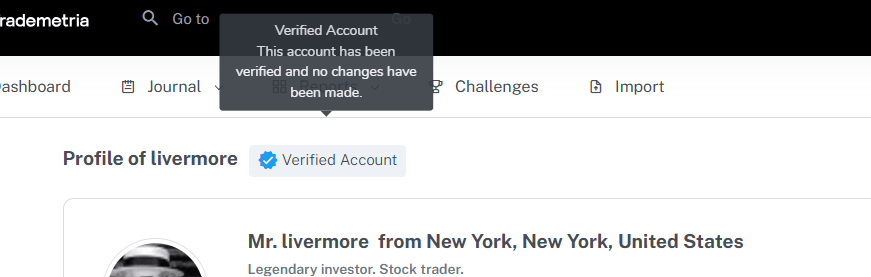
Account verification confirms that your overall trading results come directly from your broker.
When your account is connected to a supported broker with auto-sync:
- your trades import automatically
- your data remains unedited
- your performance reflects real activity
A Verified Account badge appears on your public profile, signaling that your results are authentic and trustworthy.
Trade Verification
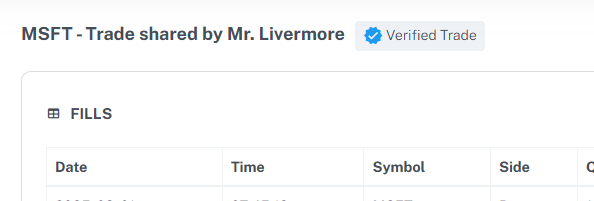
Sometimes, you don't want to share your whole account history, but a particular trade that you took during a certain time. In addition to account-level verification, Trademetria also allows you to verify individual trades.
When your account is connected to a supported broker with auto-sync:
- each trade is matched against broker data
- trades that align with synced data are marked as verified
Whenever you open a trade’s detail page, you can clearly see the blue ribbon badge if the specific trade is verified.
This adds a deeper layer of transparency, allowing both you and others to validate performance at the trade level, not just the account level.
Benefits of Verified Trading Results
Build Trust Instantly
Traders question most results and for good reason. A verified badge removes doubt and signals authenticity immediately.
Increase Credibility and Authority
If you share trades, teach, or create content, verified results show that you back your claims with real data.
Improve Conversions and Engagement
Trust drives action. Verified results increase confidence, which leads to:
- more clicks
- higher engagement
- stronger conversion rates
- more clients
Stand Out in a Competitive Market
Most traders rely on screenshots or spreadsheets. Verified results set you apart from the crowd.
Create a Transparent Trading Portfolio
Your public profile becomes a shareable track record you can use across:
- social media
- forums
- landing pages
How to Get Verified on Trademetria (Step-by-Step)
1. Connect a Supported Broker
Log into Trademetria and connect a broker that supports automatic syncing. (See how to connect each broker on Trademetria Integrations)
2. Enable Auto-Sync
Make sure your trades import directly from your broker without manual input.
3. Complete Your Profile
Go to your profile page and fill in the required details.
4. Avoid Manual Edits
Keep your trades untouched. Manual changes will void verification.
5. Check Your Verification Status
Open your public profile and look for your badge:
- Verified Account if everything syncs correctly
- Unverified Account if requirements are not met
Our system can also recognize demo or simulator accounts from most brokers. If you trade a demo account and haven't edited your trades, it will display a "Verified Simulation Account" badge. This is useful for prop firm traders who trade simulated accounts and want to verify their profits. Unlike screenshots or spreadsheets, this method removes doubt and builds trust. That same principle is why some funding programs now treat a track record as the product itself. On Darwinex Zero, for example, traders build a certified performance history on a virtual account, and investor capital is allocated based on that record rather than a one-off challenge. In both cases, the people evaluating your results want proof, not just a screenshot.
Why Trademetria Verification Is Different
Trademetria connects directly to your broker. This ensures your verified trading results stay accurate, consistent, and transparent.
Unlike screenshots or spreadsheets, this method removes doubt and builds trust.
Final Thoughts
In a space full of skepticism, verified trading results give you a real edge.
They don’t just show your performance, they prove it.
If you want to build trust, grow an audience, or increase conversions, start using verification on Trademetria.